On-demand (Run specific tests) — GitHub Actions
You do not need Cursor. There is no /on-demand-specific-test-run command in this guide. Use the GitHub Actions UI and normal repo search (GitHub or your IDE) to find Kotlin test class names.
Workflow:
https://github.com/digibank-il/mobile-tests/actions/workflows/run-specific-tests.yml
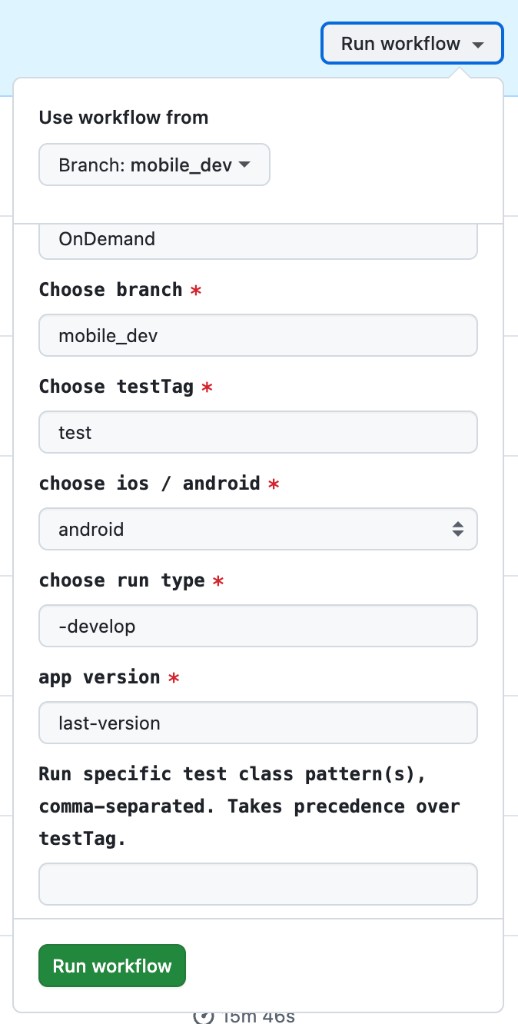
1. Open “Run workflow”
- Open the link above (you need access to the repo and Actions).
- Click Run workflow (top right).
- Under Use workflow from, pick the branch that contains the workflow you want (often
mobile_devor the branch your team uses).
2. Fill the form
| Field | What to put |
|---|---|
| Choose branch | The branch the run should use (often matches “Use workflow from”). |
| Choose testTag | Your team’s tag (e.g. test). If you use “Run specific test class pattern(s)” below, this tag is overridden for which tests run. |
| choose ios / android | android or ios. |
| choose run type | Your team’s value (e.g. -develop). |
| app version | Your team’s value (e.g. last-version). |
| Run specific test class pattern(s), comma-separated. Takes precedence over testTag. | This is the important field. See the next section. |
Then click the green Run workflow button.
3. The important field: “Run specific test class pattern(s)”
Label in the UI:
What to paste
- Comma-separated list of test class patterns.
- Each entry uses a leading
*plus the Kotlin class name (no package, no quotes). - No
--testsflags, Gradle task names, or file paths—only the*ClassNamepatterns in this field.
One test class:
*DepositChequeTest
Several test classes:
*DepositChequeTest,*ToggleBiometricTest,*QuickLogInBlockedAfter5TimesTest
- If several scenarios map to the same class (common for parameterized tests), you only need one entry for that class.
- If this field is non-empty, it takes precedence over testTag.
4. How to find the class name (manual)
You need the class name (e.g. DepositChequeTest), not the human-readable test title alone.
Option A — Search on GitHub
- In the mobile-tests repo, use code search in
src/test/kotlin. - Search for keywords from the test scenario, or for:
- Backtick method names:
fun `Some test description here`() - Parameterized tests:
@ParameterizedTest(name = "...")
- Backtick method names:
- Open the matching
.ktfile and find theclassdeclaration (e.g.class DepositChequeTest). - Use that name as
*DepositChequeTest.
Option B — Search locally
If you have the repo cloned, search under src/test/kotlin the same way, then read the class name from the file.
Parameterized tests
If a test uses @ParameterizedTest, multiple rows may share one class. You usually still target the class (one *ClassName entry); narrowing to a single parameter row is not guaranteed from this field alone.
5. Quick checklist
- Correct platform (
android/ios). - Correct branch for the code you want to exercise.
- “Run specific test class pattern(s)” contains
*ClassNameentries, comma-separated. - You used class names, not method names or descriptions.
Screenshot